MCP Explained: Complete Protocol Guide 2026
Claude MCP explained: JSON-RPC tools/list and tools/call, a Streamable HTTP client guide, and authorization and security best practices from the spec.

TL;DR: Model Context Protocol (MCP) is an open standard that provides a universal JSON-RPC interface for connecting AI models to external tools, data sources, and services — replacing fragmented per-tool integrations with a single, composable protocol.
Key Takeaways
- MCP is an open protocol using JSON-RPC 2.0 that standardizes how AI applications discover and invoke external tools, eliminating the N×M integration problem.
- The architecture follows a client-server model with three primitives: tools (actions), resources (data), and prompts (templates) — each independently discoverable.
- MCP defines two standard transports, stdio and Streamable HTTP, enabling both local process-based servers and remote network-accessible deployments; the original HTTP+SSE transport is deprecated.
- Building an MCP server requires as few as 30 lines of TypeScript or Python, making it accessible to any developer familiar with basic API patterns.
- Claude Code, Cursor, Cline, Windsurf, and VS Code Copilot extensions all support MCP, creating a broad ecosystem of interoperable AI tooling.
- MCP solves what function calling cannot: persistent connections, stateful sessions, dynamic tool discovery, and cross-client portability of integrations.
What is Model Context Protocol (MCP)?
Model Context Protocol (MCP) is an open standard published by Anthropic that defines a universal interface for connecting AI assistants to external data sources, tools, and services. Think of it as USB-C for AI integrations — one protocol that works everywhere, replacing dozens of proprietary connectors.
MCP establishes a structured communication layer between AI applications (called "hosts") and capability providers (called "servers"). The protocol uses JSON-RPC 2.0 as its messaging format, supports capability negotiation at connection time, and provides three distinct primitives for different types of interactions: tools for executing actions, resources for reading data, and prompts for reusable templates.
The specification lives at modelcontextprotocol.io/specification and is maintained as an open standard; the current revision is 2026-07-28. Any AI client can implement the protocol, and any developer can build servers that instantly become available to every MCP-compatible tool in the ecosystem.
What makes MCP particularly significant in 2026 is its adoption velocity. Within 18 months of its initial release, MCP support has been integrated into Claude Code, Cursor, Cline, Windsurf, GitHub Copilot, and dozens of VS Code extensions — making it the de facto standard for AI tool integration.
How does MCP work?
MCP follows a client-server architecture where the AI application acts as a host managing one or more client connections, and each MCP server exposes a specific set of capabilities.
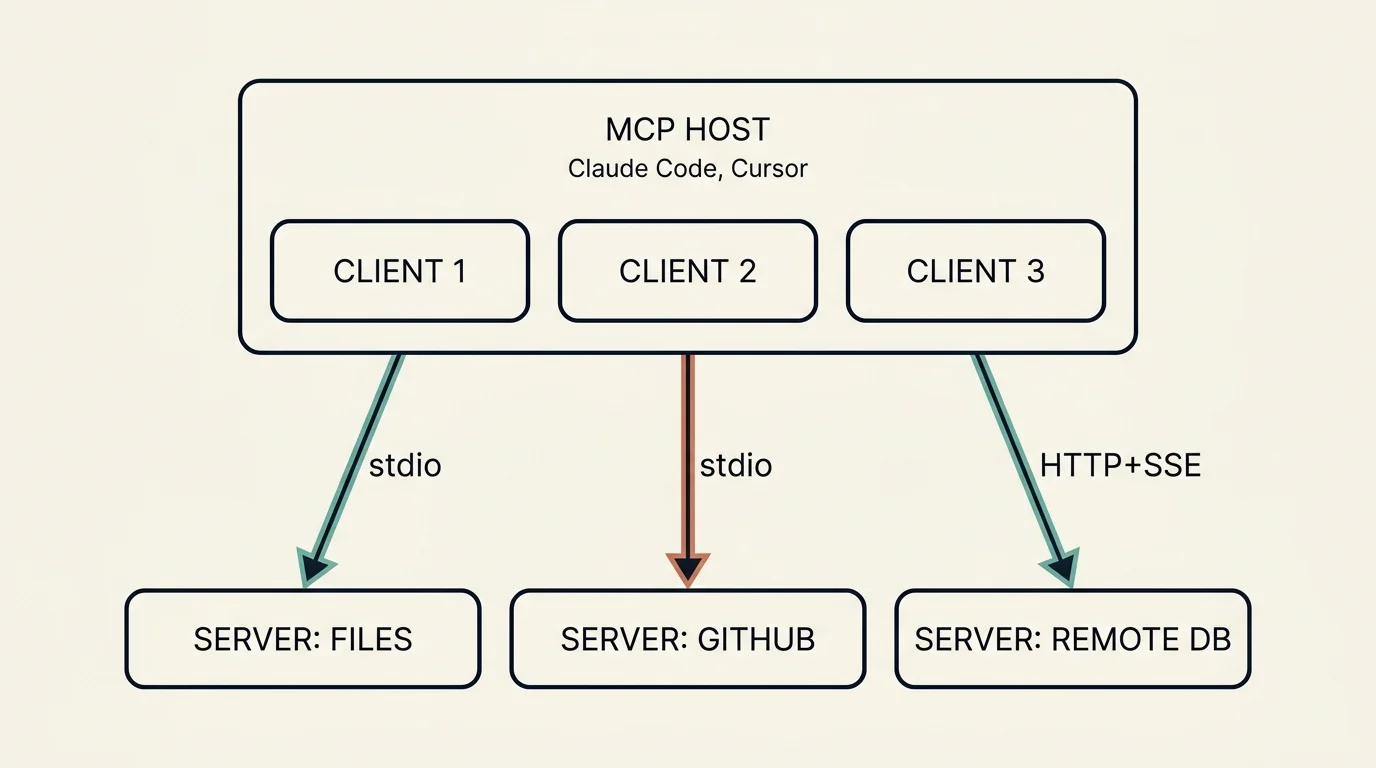
A single MCP host (Claude Code, Cursor) runs one client per connection. Each client speaks to a dedicated MCP server over a transport — stdio for local servers (filesystem, GitHub), Streamable HTTP for remote ones (a hosted database). The host multiplexes across all of them.
For protocol revisions up to 2025-11-25, which the current spec calls the legacy, initialize-based versions, the connection lifecycle works as follows:
- Initialization: The host spawns or connects to an MCP server. The client sends an `initialize` request containing its supported protocol version and capabilities.
- Capability negotiation: The server responds with its own capabilities — which primitives it supports (tools, resources, prompts) and any optional features like logging or sampling.
- Discovery: The client calls `tools/list`, `resources/list`, or `prompts/list` to enumerate available capabilities.
- Invocation: When the AI model decides to use a tool, the client sends a `tools/call` request with the tool name and arguments. The server executes the operation and returns results.
- Session management: The connection persists for the duration of the session, allowing stateful interactions and server-initiated notifications.
The 2026-07-28 revision removes this handshake and makes MCP stateless: every request carries its protocol version and client capabilities in a _meta field, servers expose server/discover instead of initialize, and state that must span calls travels as explicit handles in tool arguments. The wire-level walkthrough below covers both eras and how a client detects which one a server speaks.
Transports define how messages travel between client and server:
- stdio: The host spawns the server as a child process and communicates via stdin/stdout. Best for local tools, fast, zero network configuration. This is what Claude Code and Cursor use by default.
- Streamable HTTP: The client sends each JSON-RPC message as an HTTP POST to a single MCP endpoint, and the server answers with either one JSON object or a Server-Sent Events (SSE) stream scoped to that request. Best for remote servers, shared team infrastructure, and cloud deployments. It replaced the 2024-11-05 HTTP+SSE transport, which is deprecated.
All messages follow JSON-RPC 2.0 format — requests carry a method name and params object, responses carry a result or error object.
How does MCP work on the wire: JSON-RPC, tools/list and Streamable HTTP?
Everything in MCP is a JSON-RPC 2.0 message: a request with a string or integer id that must never be null, a response carrying result or error for that id, or a notification with no id and no reply. The transport only decides how those messages are framed and delivered; the method names and payloads are identical over stdio and HTTP. This section follows the three questions implementers ask most: how a client lists and calls tools, how the handshake changed between protocol revisions, and how to implement a Streamable HTTP client.
tools/list and tools/call: the official JSON-RPC flow
Tool discovery is one request. The client sends tools/list, optionally with a cursor for pagination, and the server answers with the tools currently available to that caller. In the 2026-07-28 revision every request also carries the protocol version and client capabilities in _meta:
The response lists each tool's name, description and JSON Schema inputSchema, plus optional title, outputSchema, annotations and icons, and a nextCursor when there are more pages. Since 2026-07-28 list results also carry resultType, a ttlMs freshness hint and a cacheScope, and servers should return tools in a deterministic order so clients and LLM prompt caches can reuse the list:
The host turns those definitions into the function-calling tools it presents to the model. When the model picks one, the client sends tools/call with the tool name and arguments; the result is a content array (text, image, audio, resource links or embedded resources), optionally structuredContent that conforms to the tool's outputSchema, and an isError flag:
Two error channels matter. A protocol error such as an unknown tool comes back as a JSON-RPC error (code -32602), which the model is unlikely to fix. A tool execution error, such as invalid input or a failed downstream API call, comes back as a normal result with isError: true so the model can read the message and retry. Servers that declare "tools": { "listChanged": true } send notifications/tools/list_changed when their tool set changes; in 2026-07-28 a client receives it by opening a subscriptions/listen stream with toolsListChanged: true, while 2025-11-25 and earlier delivered it on the standalone GET SSE stream. The spec also tells clients to treat tool annotations as untrusted unless the server is trusted, to show tool inputs to the user before calling the server, and to keep a human able to deny any invocation.
Two eras of the handshake: initialize versus per-request metadata
Protocol revisions up to 2025-11-25 open every connection with a three-step handshake. The client sends initialize with its protocolVersion, capabilities and clientInfo; the server replies with the version it will speak, its own capabilities (tools, resources, prompts, logging and so on), serverInfo and optional instructions; and the client confirms with a notifications/initialized notification. Apart from pings and server log messages, nothing else should travel before that completes. Over HTTP the server may also mint an Mcp-Session-Id on the InitializeResult response, which the client must echo on every later request; a 404 means the session is gone and the client must initialize again, and an HTTP DELETE ends it.
The 2026-07-28 revision removes all of that. There is no handshake and no protocol-level session: every request carries io.modelcontextprotocol/protocolVersion and io.modelcontextprotocol/clientCapabilities in _meta (and should carry clientInfo), and the server answers each request independently. Servers must implement server/discover, which returns supportedVersions, capabilities, serverInfo and instructions in one round trip; clients may call it first or simply send tools/list and handle an UnsupportedProtocolVersionError (code -32022) that lists the versions the server supports. Every result now carries resultType, either "complete" or "input_required"; the latter replaces server-initiated sampling, elicitation and roots requests with an inputRequests payload that the client answers by retrying the original request with inputResponses. A client that must talk to both eras tries a modern request first: on stdio it probes with server/discover and falls back to initialize on any error that is not a recognized modern error; on HTTP it inspects the body of a 400 Bad Request and falls back only when no modern JSON-RPC error is present.
Streamable HTTP client implementation guide
Streamable HTTP, introduced in protocol version 2025-03-26, is the transport to implement for remote servers. The 2026-07-28 binding works like this:
- One endpoint, POST only. The server exposes a single MCP endpoint such as `https://example.com/mcp`. Send every JSON-RPC request or notification as its own HTTP POST, and never send JSON-RPC responses to the server.
- Headers. Send `Accept: application/json, text/event-stream` on every POST. Mirror the body's metadata into headers: `MCP-Protocol-Version` (must equal the `_meta` protocol version), `Mcp-Method` (the JSON-RPC method) and `Mcp-Name` (the tool name, resource URI or prompt name for `tools/call`, `resources/read` and `prompts/get`). If a tool's `inputSchema` marks a parameter with `x-mcp-header`, add `Mcp-Param-{Name}` with that argument's value, Base64-encoding anything that is not plain ASCII. A mismatch between headers and body is rejected with `400` and JSON-RPC error `-32020` (`HeaderMismatch`).
- Two response shapes. For a request, the server returns either `Content-Type: application/json` with one JSON-RPC response, or `Content-Type: text/event-stream` with an SSE stream scoped to that request, on which `notifications/progress` or `notifications/message` may arrive before the final response terminates the stream. Your client must handle both. For a notification the server returns `202 Accepted` with no body.
- Change notifications. To receive `notifications/tools/list_changed` or `notifications/resources/updated`, POST a `subscriptions/listen` request naming the notification types you want and keep its SSE response stream open. The server acknowledges with `notifications/subscriptions/acknowledged`, tags each notification with `io.modelcontextprotocol/subscriptionId`, and may send SSE comment lines as keep-alives that you must ignore.
- Cancellation and failures. Closing a request's response stream is the cancellation signal; no `notifications/cancelled` is sent over HTTP. Streams are not resumable (`Last-Event-ID` is gone), so if a stream breaks mid-request, re-issue the request with a new `id`.
- No sessions. Do not expect or send `Mcp-Session-Id`; a server that speaks only 2026-07-28 answers GET and DELETE with `405` and ignores session and `Last-Event-ID` headers. State that must span calls, such as a browser context or a shopping cart, is an explicit handle the server returns from one tool and accepts as an argument in the next.
- Multi round-trip input. If a result arrives with `resultType: "input_required"`, satisfy each entry in `inputRequests` (for example an `elicitation/create` form) and retry the original request with `inputResponses` and the server's `requestState`, under a new request `id`.
- Version negotiation and fallback. On a `400` whose body is an `UnsupportedProtocolVersionError`, retry with one of the advertised `supported` versions. On a `400`, `404` or `405` with no recognized modern error body, fall back to the legacy `initialize` flow of 2025-11-25 (sessions, standalone GET stream, `Last-Event-ID` resumption) and, only if you must support 2024-11-05 servers, issue a GET and look for the deprecated HTTP+SSE `endpoint` event.
- Security on both sides. Servers must validate the `Origin` header and return `403` when it is invalid, which defeats DNS rebinding; they should bind to `127.0.0.1` when running locally and should authenticate every connection. Clients send credentials only in the `Authorization: Bearer` header, never in the query string, and handle `401` by starting the authorization flow described next.
A compliant tools/call POST therefore looks like this:
The official TypeScript SDK and Python SDK implement this binding on both sides, and the MCP Inspector lets you watch the raw exchange while you build.
Authorization and security best practices from the specification
Authorization is optional in MCP and is defined for HTTP transports only; stdio servers should read credentials from their environment instead. When a server is protected, the authorization specification says:
- The MCP server acts as an OAuth 2.1 resource server. It must publish OAuth 2.0 Protected Resource Metadata (RFC 9728) and point unauthenticated clients at it with `HTTP 401` plus `WWW-Authenticate: Bearer resource_metadata="..."`, ideally with a `scope` hint so clients request only the privileges the operation needs.
- Clients read the authorization server's location from that metadata and must support both RFC 8414 Authorization Server Metadata and OpenID Connect Discovery. They obtain a `client_id` through Client ID Metadata Documents (the recommended path, where an HTTPS URL serves as the client ID), pre-registration, or Dynamic Client Registration (RFC 7591, now deprecated but kept for authorization servers that lack metadata-document support).
- Every authorization and token request must carry the `resource` parameter (RFC 8707) naming the MCP server's canonical URI, and the flow uses PKCE as OAuth 2.1 requires. Clients record the authorization server's `issuer` before redirecting and must validate an `iss` value in the response (RFC 9207) before redeeming the code, which defeats mix-up attacks.
- Tokens travel only in the `Authorization: Bearer` header on every request, never in URLs. Servers must validate that a token was issued for them as audience, must answer invalid or expired tokens with `401`, and must not accept or forward tokens meant for other services. This ban on "token passthrough" is spelled out in both the authorization spec and the security guidance.
- A `403` with `error="insufficient_scope"` and the missing scopes drives step-up authorization: the client re-authorizes with the union of its previous scopes and the challenged ones, with retry limits so a misconfigured server cannot loop it.
The security best practices document adds the attack patterns to design against: the confused deputy problem, where an MCP proxy server that uses a static third-party client ID must obtain per-client consent before forwarding to the third-party authorization server; SSRF through attacker-controlled discovery URLs, mitigated by requiring HTTPS and blocking private, loopback and link-local ranges; state handle hijacking (and session hijacking on 2025-11-25 servers), mitigated by never treating a handle or session ID as authentication and binding it server-side to the verified user; local server compromise, where one-click installers must show the exact command before executing it and should sandbox the process; authorization URL validation, allowing only http on loopback and https elsewhere and never opening URLs through a shell; and scope minimization, starting with a small scope set and escalating through challenges. Claude Code follows the client side of this flow: a remote server that answers 401 or 403 is marked as needing authentication, and /mcp runs the browser login.
What problem does MCP solve?
Before MCP, every AI tool built its own integrations from scratch. Claude had its own tool-use format, GPT had function calling, and every IDE extension reimplemented connections to GitHub, databases, and file systems independently.
This created an N x M integration problem: N AI clients each needing custom adapters for M services. If you had 5 AI tools and 20 services, you needed up to 100 separate integrations — each with its own authentication handling, error formats, and maintenance burden.
MCP collapses this to N + M: each AI client implements one protocol, each service exposes one server, and everything connects.
Beyond the integration math, MCP solves several problems that simple function calling cannot address:
- Dynamic discovery: Tools are discovered at runtime, not hardcoded at prompt time. A server can add new capabilities without any client-side changes.
- Persistent state: MCP connections are long-lived sessions. A database server can maintain a connection pool, a browser automation server can keep a page open across multiple interactions.
- Portability: An MCP server you build for Claude Code works immediately in Cursor, Cline, or any other MCP-compatible client. Write once, use everywhere.
- Security isolation: Servers manage their own credentials. The AI model never sees API keys — it only sees the tool interface.
- Composability: Multiple servers can be active simultaneously, each providing different capabilities that the AI can combine freely.
MCP vs Function Calling: What's the difference?
Function calling (as implemented in OpenAI, Anthropic, and other APIs) and MCP serve different layers of the stack. Here is a direct comparison:
In practice, MCP and function calling are complementary. Claude Code uses MCP to connect to external servers, and those servers' tools get presented to the model as function calls in the underlying API. MCP is the connectivity layer; function calling is the invocation mechanism within a single model turn.
The key insight: function calling tells the model what tools exist. MCP tells the client where to find tools and how to execute them.
How do you build an MCP server?
Building an MCP server is straightforward with the official SDKs. Here is a complete TypeScript server that exposes a single tool for checking website status:
To use this server with Claude Code, add it to your project's .mcp.json:
For Python developers, the FastMCP framework provides an even more concise API:
Both examples produce fully spec-compliant MCP servers that work with any client. The SDKs handle JSON-RPC framing, capability negotiation, and transport management automatically.
Which AI tools support MCP?
As of May 2026, MCP has been adopted across the major AI development tools:
- Claude Code (Anthropic) — Full MCP support via `claude mcp add`, with project-scoped servers in `.mcp.json` and local- or user-scoped servers in `~/.claude.json`. Supports stdio and Streamable HTTP (SSE is deprecated), with OAuth login for remote servers through the `/mcp` command.
- Cursor — MCP integration in settings, supports project-scoped and global server configurations. One of the earliest third-party adopters.
- Cline (VS Code extension) — Acts as a full MCP host, managing multiple client connections with explicit user approval for all server actions.
- Windsurf (Codeium) — MCP support for tool extensibility within its AI-powered IDE.
- GitHub Copilot — MCP server support in VS Code via the Copilot extension settings.
- VS Code (native) — Built-in MCP support in the Chat panel starting with VS Code 1.99.
- Continue (open-source) — MCP-compatible AI coding assistant with full server support.
- Zed — MCP integration in its AI assistant panel.
- Amazon Q Developer — MCP server support for extending Q's capabilities.
The MCP server ecosystem includes thousands of community-built servers available via npm, PyPI, and the official MCP Server Registry. Popular categories include database connectors (PostgreSQL, MongoDB, Redis), cloud service integrations (AWS, GCP, Cloudflare), developer tools (GitHub, Linear, Jira), and browser automation (Playwright, Puppeteer).
What are MCP resources, tools, and prompts?
MCP defines three primitives that servers can expose, each serving a distinct purpose:
Tools
Tools are executable actions that the AI model can invoke. They represent operations with side effects — querying a database, creating a file, sending a message, or calling an API. Tools are the most commonly used primitive.
Each tool has a name, description, and a JSON Schema defining its input parameters. The server validates inputs and returns structured results. Examples: run_query, create_issue, send_email.
Tools are model-controlled — the AI decides when and how to call them based on the user's intent.
Resources
Resources represent read-only data that provides context to the AI. They use URI-based addressing (like file:///path/to/doc or postgres://db/table) and can be static or dynamic. Resources let the AI access information without executing actions.
Examples: a file's contents, a database schema, a configuration object, the current user's profile. Resources support subscriptions — the server can notify the client when resource contents change.
Resources are application-controlled — the host application decides which resources to attach to the conversation context.
Prompts
Prompts are reusable templates that define structured interactions. They can include placeholders for arguments and can reference tools or resources. Think of them as saved workflows that users can invoke by name.
Examples: a code-review prompt that takes a file path argument, or a summarize-pr prompt that fetches PR data and formats a summary. Prompts are user-controlled — they are explicitly selected by the user from a menu or command palette.
The three-primitive model provides clean separation: tools for doing, resources for knowing, prompts for orchestrating.
What are best practices for MCP server development?
Building production-quality MCP servers requires attention to several key areas:
1. Keep tools focused and composable. Each tool should do one thing well. Rather than a monolithic manage_database tool, expose run_query, list_tables, and describe_schema as separate tools. This gives the AI model clearer choices and reduces error rates.
2. Write descriptive tool schemas. The model relies entirely on your tool's name, description, and parameter descriptions to decide when and how to use it. Invest time in clear, specific descriptions. Include examples of valid inputs in parameter descriptions.
3. Handle errors gracefully. Return structured error messages in the tool result rather than throwing exceptions. Include enough context for the model to understand what went wrong and suggest a fix. Never expose internal stack traces.
4. Use stateful connections wisely. MCP's persistent sessions enable connection pooling, caching, and incremental operations. A Git server can maintain a working tree reference across multiple tool calls. A browser server can keep a page open between navigation steps.
5. Implement proper security boundaries. Never accept credentials from the AI model. Store secrets in environment variables or secure vaults. Validate all inputs against your schema before execution. Consider rate limiting for servers exposed over HTTP.
6. Test with multiple clients. An MCP server should work identically across Claude Code, Cursor, and Cline. Test with at least two clients during development to catch assumptions about client behavior. The MCP Inspector (npx @modelcontextprotocol/inspector) provides a standalone test UI.
What's the future of MCP?
MCP's trajectory in 2026 points toward becoming infrastructure-grade protocol rather than a developer convenience:
Enterprise adoption is accelerating as organizations recognize that MCP servers provide a governed, auditable interface between AI assistants and internal systems. Companies can expose internal APIs through MCP servers with consistent authentication, logging, and access control — without giving AI models direct access to production systems.
The Streamable HTTP transport (replacing the older SSE-based approach) enables better scalability for remote servers, supporting stateless request-response patterns alongside persistent streaming when needed.
Server registries and marketplaces are emerging, making it possible to discover and install MCP servers as easily as npm packages. The official MCP Server Registry, community collections, and IDE-integrated marketplaces reduce the friction of finding the right server for your use case.
Standardization efforts continue to refine the spec. The protocol's governance model ensures backward compatibility while allowing the addition of new capabilities like the OAuth 2.1-based authorization framework, structured tool output validated by outputSchema, and the tasks extension for long-running operations.
Composable AI architectures increasingly rely on MCP as the glue layer. Multi-agent systems use MCP to give each agent access to different tool sets. Orchestration frameworks use MCP servers as capability modules that can be mixed, matched, and swapped without code changes.
The pattern is clear: just as REST became the universal language for web APIs, MCP is becoming the universal language for AI-tool connectivity. Developers who invest in building MCP servers today are creating infrastructure that will serve the entire AI ecosystem for years to come.
FAQ
What is an MCP server?
An MCP server is a lightweight program that exposes tools, resources, or prompts over the Model Context Protocol. It receives JSON-RPC requests from AI clients, executes the requested operations (like querying a database or calling an API), and returns structured results. Servers can run as local processes (via stdio) or as remote services (via HTTP). Any developer can build one using the official TypeScript or Python SDKs in under 50 lines of code.
How do I connect an MCP server to Claude Code?
Run claude mcp add for a local stdio server or claude mcp add --transport http for a remote one, choosing --scope local (the default, stored in ~/.claude.json), --scope project (written to .mcp.json in the repository so teammates get it) or --scope user (available in all your projects). A .mcp.json entry looks like {"mcpServers": {"my-server": {"command": "node", "args": ["./server.js"]}}}. Claude Code starts configured servers when a session begins, sends tools/list, prompts/list and resources/list to discover what they offer, and asks you to approve project-scoped servers the first time. A remote server that answers 401 triggers an OAuth login through the /mcp command.
Is MCP an open standard?
Yes. MCP was created by Anthropic and released as an open specification with no licensing restrictions on implementation. The spec is publicly available at modelcontextprotocol.io/specification, the official SDKs are open source (the project is moving its code from the MIT License to Apache-2.0), and any organization can implement clients or servers without permission or royalty. Multiple competing AI tools (Claude Code, Cursor, Cline, GitHub Copilot) have independently implemented MCP support, confirming its vendor-neutral status.
What languages can you build MCP servers in?
The official SDKs support TypeScript/JavaScript and Python, which cover the majority of MCP servers in the ecosystem. Community SDKs extend support to Rust, Go, Java, Kotlin, C#, Ruby, and Swift. Since MCP uses JSON-RPC 2.0 over standard transports (stdio or HTTP), you can technically implement a server in any language that can read from stdin, write to stdout, and parse JSON — the protocol itself is language-agnostic.
What does "Claude MCP" mean in practice?
It usually refers to one of three integration points. Claude Code is an MCP client: claude mcp add registers a server, Claude Code discovers its tools with tools/list, and the tools appear to the model next to the built-in ones, with OAuth handled through /mcp. Claude Desktop connects to local MCP servers and claude.ai to remote servers through custom connectors. For your own application, the Messages API MCP connector takes an mcp_servers array (URL, name and optional authorization_token, with the mcp-client-2025-11-20 beta header); it currently supports tool calls only and needs servers reachable over HTTP, so local stdio servers cannot be attached directly.
How does tools/list work in the official MCP JSON-RPC flow?
The client sends a tools/list request and the server returns a tools array in which each entry has a name, a description and a JSON Schema inputSchema, plus a nextCursor when the list is paginated. The client exposes those tools to the model and, when the model selects one, sends tools/call with the name and arguments; the server replies with a content array and isError, or with a JSON-RPC error for an unknown tool. In the 2026-07-28 revision every request also carries io.modelcontextprotocol/protocolVersion and io.modelcontextprotocol/clientCapabilities in _meta, and list results include ttlMs and cacheScope so clients can cache them.
How do I implement an MCP Streamable HTTP client?
POST every JSON-RPC request or notification to the server's single MCP endpoint with Accept: application/json, text/event-stream and the MCP-Protocol-Version, Mcp-Method and Mcp-Name headers mirrored from the body. Handle two response types, a single JSON object or a request-scoped SSE stream that ends with the final response, and treat 202 Accepted as the normal reply to a notification. Open a subscriptions/listen stream if you need list-change notifications, cancel by closing a response stream, re-issue a request whose stream broke, and fall back to the 2025-11-25 initialize flow when a server answers 400 without a recognized modern error body.
What are the MCP authorization and security best practices?
Protected servers follow OAuth 2.1: publish Protected Resource Metadata (RFC 9728), answer anonymous requests with 401 and a WWW-Authenticate challenge, require the resource parameter (RFC 8707) and PKCE, and accept tokens only in the Authorization: Bearer header. Servers must validate the token audience and must never pass a client's token through to a downstream API. The security best practices document adds per-client consent for proxy servers (the confused deputy problem), SSRF protections during discovery, secure random handles bound to the verified user, explicit consent before a client executes a local server's command, and least-privilege scopes with step-up challenges.
Does MCP still use the initialize handshake and Mcp-Session-Id?
Only for protocol versions up to 2025-11-25, which the current spec calls the legacy versions and still documents how to interoperate with. Those versions require initialize, the notifications/initialized confirmation and, over HTTP, an optional Mcp-Session-Id header that the server mints and the client echoes. The 2026-07-28 revision removes both: each request carries its version and capabilities in _meta, server/discover replaces the handshake, and a client that must support both eras probes first and falls back to initialize when the server does not answer with a recognized modern error.
Sources
- MCP specification 2026-07-28 overview
- MCP base protocol: JSON-RPC messages, statelessness and _meta
- MCP Streamable HTTP transport binding
- MCP tools: tools/list, tools/call and list_changed
- MCP versioning, server/discover and backward compatibility
- MCP authorization specification
- MCP security best practices
- MCP 2026-07-28 changelog
- MCP 2025-11-25 transports: sessions, GET streams and resumability
- Claude Code MCP documentation
- Claude Messages API MCP connector
- MCP TypeScript SDK
Subscribe to the newsletter
About the Author
Aaron is an engineering leader, software architect, and founder with 18 years building distributed systems and cloud infrastructure. Now focused on LLM-powered platforms, agent orchestration, and production AI. He shares hands-on technical guides and framework comparisons at fp8.co.
Cite this Article
Related Articles
How Cline Implements MCP: Source Code Deep Dive (2026)
Cline MCP internals decoded: JSON-RPC 2.0 messaging, tool discovery, security approvals, and spec compliance — all from real source code.
Agentic AIHow to Build Claude Code Skills: 5 Examples (2026)
Build custom Claude Code Skills with 5 ready-to-use examples. Covers SKILL.md spec, security controls, plugin distribution, and team sharing workflows.
AI Development ToolsAI Coding Agent Architecture: Agent Loop Deep Dive
Explore how Claude Code, Cursor, Aider, and Cline work under the hood. Agent loops, tool dispatch, and edit strategies explained.
AI Engineering